
Incident - Additional Fields
Incident - Additional Fields helps you configure additional fields to be displayed in incident templates to collect any extra information on reported incidents in addition to the preset fields.
Adding a New Field
Click Add Field. Pick from the following seven field types per your requirements.
|
Field style |
Description |
Example |
|
Single line |
A simple, short phrase, such as a name or seating location. |
Name |
|
Pick list/Radio (You can always interchange them by editing the fields) |
A list of items, such as available devices or hardware. |
List of available asset types |
|
Multi select/Checkbox (You can always interchange them by editing the fields) |
For selectable values within a list, such as various software applications available. |
List of software installed |
|
Multi line |
To describe an issue or to add comments. |
Comments |
|
Numeric |
For numbers. |
1111 |
|
Date/Time |
To specify time and date in a defined format such as May 1, 2019. |
May 1, 2016 |
|
Decimal |
To specify cost or a ratio. |
21.11(Cost in Dollars) |
After selecting the field type, fill out the displayed form as shown in the screenshot below and click Save.
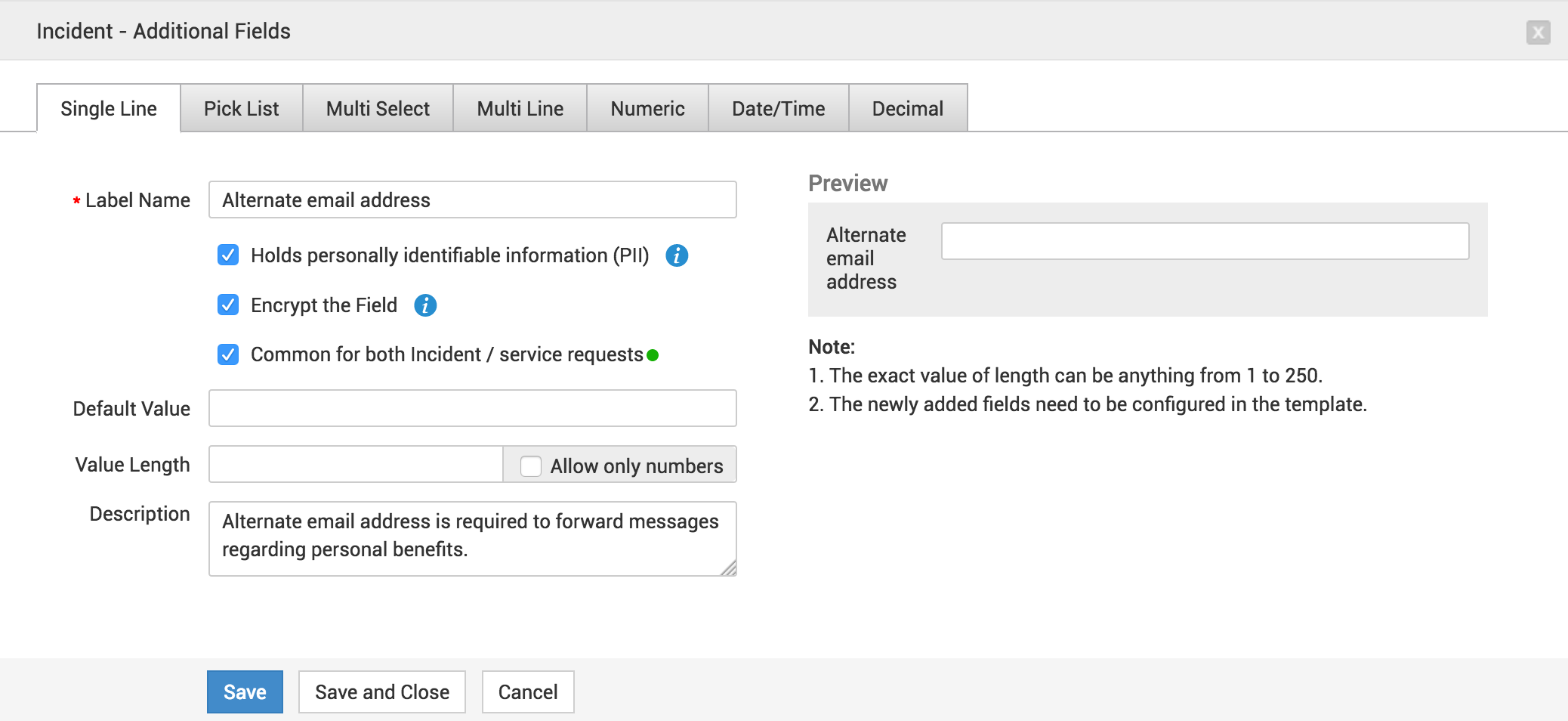
You can add a maximum of 25 answer choices using Radio/Checkbox field types. Use Pick list/Multi field types to add more answer choices.
Home Page Actions
Use Edit icon to edit the additional field.
Select an additional field and click Delete to remove the field.