
Custom mobile applications can utilize REST API calls to meet specific requirements.
To access these APIs, you'll need an authentication token. You can obtain this authentication by invoking the V3 Authentication API through the mobile application.
The following authentication mechanisms are supported:
- Active Directory (AD)
- LDAP
- Local Authentication
- SAML (Mobile App Only)
Note: RememberME, and account locking (Captcha) are not implemented because they rely on browser cookies.
REST API works as shown in the following workflow:
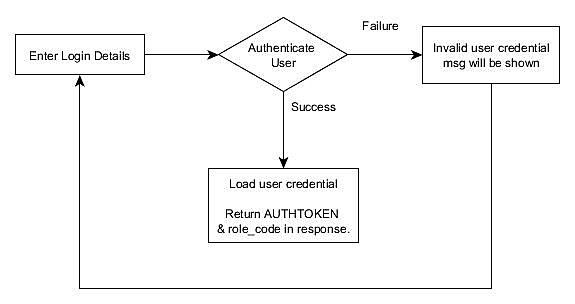
Required request headers:
- Mandatory headers for all calls
- APICLIENT=sdp_mobile
- Mandatory headers for Authentication
- mobile-app-version (Versions 14400 and above)
- For AssetExplorer: AssetExplorer/Android/2.2.3
- For ServiceDesk Plus: SDP/iOS/5.8.12
- User-Agent (Versions 13013 and before)
- For Android: Android/5.8.12 SDP
- For iOS: iOS/5.8.12 SDP
- device-uid: For every login, a new auth token will be generated for a user. If you use more than one mobile device, you will need two different auth tokens. This can be created based on the device-uid. It can be alphanumeric and the maximum allowed chars is 200.
- device-uid: <any-device-or-app-specific-unique-string>
3. For Authenticated calls
Auth token is the base that is used to identify a user and their roles in the REST API. This token will be returned in the authentication call. For subsequent requests, auth token needs to be set in the request header.
Header Parameters:
-
Supply an "AUTHTOKEN" header with content as shown below,
"AUTHTOKEN" : "<authtokenvalue>" -
roleCode
"roleCode": "<roles_hash>"
-
PORTALID is the helpdesk ID of the current portal (need to get the other portal's rolecode too via /api/v3/change_portal?portalid=$portalId)
"PORTALID": "301"
Input parameters in URL (for example):
URL: http://localhost:8080/api/v3/requests
Method: GET
Header Fields:
-
"roleCode": "102386456"
-
"AUTHTOKEN" :"AAB97B97-EA4C-4981-A975-042616892FBC"
|
Properties |
Description |
Mandatory |
Received From |
Example (To perform any request operation, we use syntax like below) |
|
AUTHTOKEN |
It is the "MOBILEAUTH_KEY" table's value for the authenticated user. Authorization check for subsequent requests will be done using this token. |
YES |
Response of the successful logon request |
Supply an "AUTHTOKEN" header with content as below, |
|
roleCode |
In every API call "AUTHTOKEN" or "TECHNICIAN_KEY" will be passed. Based on it, we can get the associated roles list of that particular user. "role_code" is the hash code of the associated roles list of the user who performs API call.
|
YES |
Response of the successful logon request |
"roleCode" : "102386456" |
List of supporting API calls for authentication :
- Getting basic login properties.
- Get local auth or AD auth domains for the given username.
- "Authenticate" call, which takes in username, password, domain, and auth_type to authenticate the user.
- ApI to get basic properties of the user after login.
Authentication API Reference:
| Operation | URI | HTTP Method | Sample Input | Sample Output |
|
List all basic properties required for authentication (It is an unauthenticated call) |
/api/v3/app_resources/properties | GET | NIL |
When domain listing is enabled: "result": { "login_props": { "auth_types": { "local_auth": { "is_enabled": true }, "saml_auth": { "is_enabled": true, "req_url": "https://servicedesk.com/SamlRequestServlet" }, "ldap_auth": { "is_enabled": false }, "ad_auth": { "is_enabled": false } }, "v3_header_supported": true, "dynamic_user_addition": true, "domain_props": { "domain_filtering": false, "domain_listing": true, "domains_list": [ "SDP-MANAGE", "WORKGROUP" ] }, "password_encryption": { "is_enabled": true, "public_key": "MIIBIjANBgkqhkiG9w0BAQEFAAOCAQ8AMIIBCgKCAQEA3I gxohANNbkwBRh8YAHMhOfODq8sn71GUWhH5zyK+ULPa06Os59YsSom0ULt3OnCu6ksHOd2+D9 Gznrl4dP9an01fvo0NdbCPPSOmoURbFZKG3dVwyKZ2U39rzekDJT8dSavoHb16gzuN3fVN8W6Q9MTSue2+wba VjGC4NTrI2n0FLE1+R7hPMQgcDbnEYLkm7KelMbyT6+gzVS/KMvYxIlFnq5MIrYnc3zIo2l+d5XnRyJng0/5r+CBlfrAq5 XaZnBMLTWZ7Xex5Vbo5J4EwcD6i0qxpeFTatXjFyppUVPef/vLTAlRYBILsTilLfMXtFxNSMKoerHNPNObuZk0oQIDAQAB" }, "forgot_password": { "is_enabled": true } } }, "response_status": { "status_code": 2000, "status": "success" } } ---------------------------------------------------- When domain_listing is disabled (user should type DOMAIN\username manually):
{ "result": { "login_props": { "auth_types": { "local_auth": { "is_enabled": true }, "saml_auth": { "is_enabled": true, "req_url": "https://servicedesk.com/SamlRequestServlet" }, "ldap_auth": { "is_enabled": false }, "ad_auth": { "is_enabled": false } }, "v3_header_supported": true, "dynamic_user_addition": true, "domain_props": { "domain_filtering": false, "domain_listing": false }, "password_encryption": { "is_enabled": true, "public_key": "MIIBIjANBgkqhkiG9w0BAQEFAAOCAQ8AMIIBCgK CAQEA3IgxohANNbkwBRh8YAHMhOfODq8sn71GUWhH5zyK+ULPa06Os59YsSom0 ULt3OnCu6ksHOd2+D9Gznrl4dP9an01fvo0NdbCPPSOmoURbFZKG3dVwyKZ2U39rzekDJT8 dSavoHb16gzuN3fVN8W6Q9MTSue2+wbaVjGC4NTrI2n0FLE1+R7hPMQgcDbnEYLkm7KelMbyT 6+gzVS/KMvYxIlFnq5MIrYnc3zIo2l+d5XnRyJng0/5r+CBlfrAq5XaZnBMLTWZ7Xex5Vbo5J4EwcD6 i0qxpeFTatXjFyppUVPef/vLTAlRYBILsTilLfMXtFxNSMKoerHNPNObuZk0oQIDAQAB" }, "forgot_password": { "is_enabled": true } } }, "response_status": { "status_code": 2000, "status": "success" } } |
|
Search for a user in Local Authentication or AD Auth. 'auth_type' can be either 'local_auth' or 'ad_auth'
For local auth, the "domains_list" will contain domains of a user associated in "AAALOGIN" table alone while for AD auth, we list domains from "AAALOGIN" that are also mapped to "DOMAININFO" table.
For example, if there are two users with same username "A" and one of them is imported from "sdpexchange" and another user is created manually from form choosing a domain that was added with the name "aeexchange" without mapping the domain controller, only the sdpexchange domain details are stored in "DOMAININFO" and "AAALOGIN" tables while aeexchange is maintained in "AAALOGIN" table alone.
"local_auth" does not verify whether domain exists or not in DOMAININFO but fetch from the AAALOGIN alone. But "ad_auth" will list active domains that exists and users that match that domain. In this case "local_auth" call will list "sdpexchange" and "aeexchange". "ad_auth" call will list "sdpexchange" alone. |
/api/v3/app_resources/domains | GET |
LocalAuth: input_data= { "username": "mike", "auth_type": "local_auth" } |
When domain filtering is enabled: { "result": { "domains_list": [ "WORKGROUP", "Not in Domain" ], }, "response_status": { "status_code": 2000, "status": "success" } } ------------------------------------ When domain filtering is disabled:
{ "result": { "domains_list": [ "WORKGROUP", "SDP-MANGAE", "SDP-TEAM", "Not in Domain" ], }, "response_status": { "status_code": 2000, "status": "success" } } |
|
Authenticates a user
Password encryption: |
/api/v3/app_resources/authenticate | POST |
Local Auth: input_data= { "username": "ed", "password": "hagane", "domain": "SDP-MANAGE", "auth_type": "local_auth" }
AD Auth: input_data= { "username": "itachi", "password": "senya", "auth_type": "ad_auth", "domain": "SDP-MANAGE" }
LDAP Auth: input_data={ "username": "zoro", "password": "roronoa", "auth_type": "ldap_auth" }
SAML Auth (mobile app only; called after signing in in WebView):
input_data={ "auth_type": "saml" } |
Successful Authentication:
{ "result": { "user_info": { "role_code": 796960268, "auth_token": "JbjAHirc23O4eI1zMorCOg==" } }, "response_status": { "status_code": 2000, "status": "success" } }
Failed Authentication: { "response_status": { "status_code": 4000, "messages": [ { "status_code": 4002, "type": "failed", "message": { "message": "Login Failed. Username and/or password provided is wrong" } } ], "status": "failed" } }
No tech key and API Generation is disabled. { "response_status": { "status_code": 4000, "messages": [ { "status_code": 4510, "type": "failed", "message": { "message": "Automatic key generation is not enabled. Technician key couldn't be generated" } } ], "status": "failed" } }
When Requester MobileApp is disabled: { "response_status": { "status_code": 4000, "messages": [ { "status_code": 4002, "type": "failed", "message": { "message": "Requester are not allowed to use API client" } } ], "status": "failed" } } |
| Basic properties to be returned after signing in in mobile app (Internal Only). | /api/v3/app_resources/post_login_props | GET | NIL |
For technician: { "result": { "base_currency": "$", "email_id": null, "is_technician": true, "phone": "1234455", "name": "administrator", "mobile": "1234567890", "build_number": "11129", "portal_id": 1, "department": null, "product_name": "ManageEngine ServiceDesk Plus" }, "response_status": { "status_code": 2000, "status": "success" } } For Requester: { "result": { "base_currency": "$", "email_id": "edward+7@zohocorp.com", "is_technician": false, "phone": "8888", "name": "Guest", "mobile": "1234567890", "build_number": "11129", "portal_id": 1, "department": null, "product_name": "ManageEngine ServiceDesk Plus" }, "response_status": { "status_code": 2000, "status": "success" } } |
SAML support in Mobile app
-
From the /properties call, the following information is obtained. This URL needs to be called in a web view when the SAML button is clicked
"saml_auth": {
"is_enabled": true,
"req_url": "https://servicedesk.com/SamlRequestServlet"
},
-
The mobile app will include the APICLIENT header and device-uid headers (as mentioned above)
-
These header differentiates a normal browser sign in and the sign in from the WebView of the mobile app.
-
After successful login, we provide the auth_token and role_code as json response.
-
We enclose this json in the hidden div element (with id="response_json") and show a text "Loading... Please Wait".
-
Once the mobile app gets this response, they will close the WebView and proceed with the role_code and auth_token
-
If the user cannot log in (requester not allowed to use mobile app, etc.) we will still show "Loading... Please wait" but the response_json will have the appropriate error message with which the mobile app can show corresponding pop-up messages.
Success Response:
<div id="response_json" hidden="">
{"result":{"user_info":{"role_code":938478254,"auth_token":"tgfx6PFqACUHpqeljK9tXw=="}},"response_status":{"status_code":2000,"status":"success"}}</div>
<p>Loading... Please Wait...</p>
{"result":{"user_info":{"role_code":938478254,"auth_token":"tgfx6PFqACUHpqeljK9tXw=="}},"response_status":{"status_code":2000,"status":"success"}
{"result":{"user_info":{"role_code":938478254,"auth_token":"tgfx6PFqACUHpqeljK9tXw=="}},"response_status":{"status_code":2000,"status":"success"}}
{"result":{"user_info":{"role_code":938478254,"auth_token":"tgfx6PFqACUHpqeljK9tXw=="}},"response_status":{"status_code":2000,"status":"success"}}
Loading... Please Wait...
{"result":{"user_info":{"role_code":938478254,"auth_token":"tgfx6PFqACUHpqeljK9tXw=="}},"response_status":{"status_code":2000,"status":"success"}}
Loading... Please Wait...
Failure Response:
<div id="response_json" hidden="">
{"response_status":{"status_code":4000,"messages":[{"status_code":4002,"type":"failed","message":{"message":"User doesn't have access to any instance or API not allowed for requester"}}],"status":"failed"}}</div>
<p>Loading... Please Wait...</p>